Do tej pory CueQuote było miejscem, do którego się wchodziło. Otwierałeś aplikację, opisywałeś wydarzenie i dostawałeś ofertę. To wciąż jest sedno — ale pozostawała oczywista luka: oferta żyła w CueQuote i nigdzie indziej. Ta wersja zamyka tę lukę w czterech kierunkach: Twoja strona, Twoje własne systemy, Twój CRM i Twój asystent AI.
Natychmiastowy formularz wyceny na stronie. Większość stron firm AV kończy się na „skontaktuj się po wycenę”. Odwiedzający wypełnia formularz, czeka dwa lub trzy dni, a w międzyczasie pyta też dwóch Twoich konkurentów. Nowy formularz wyceny zastępuje to prawdziwą liczbą, zanim jeszcze skończy czytać stronę.
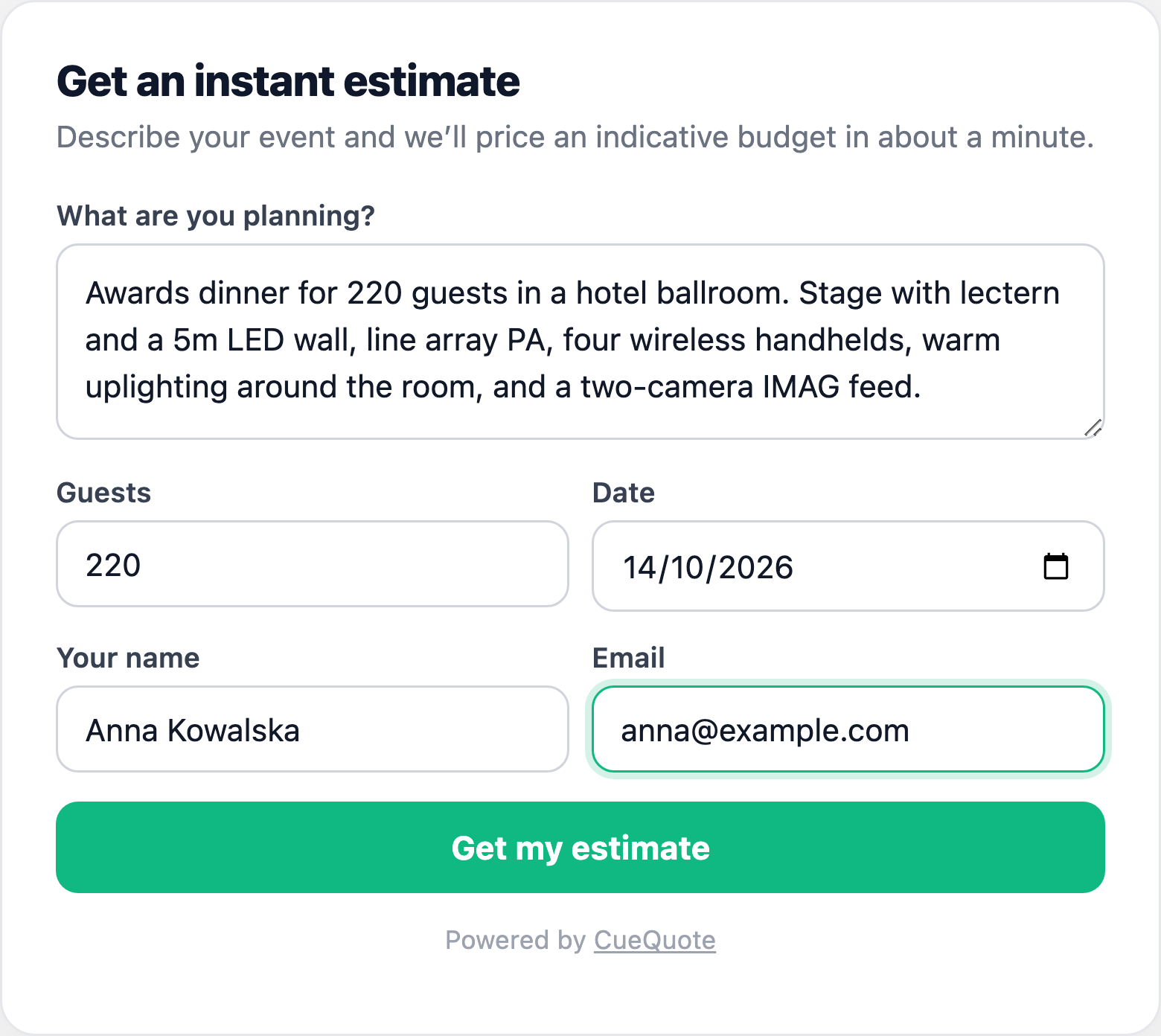
Formularz oczami odwiedzającego — jeden znacznik script, bez iframe, bez budowania.
Instalacja to pojedynczy znacznik script. Wklej go w WordPressie, Squarespace, Wix, Webflow lub zwykłym HTML-u, a formularz pojawi się dokładnie tam, gdzie go umieścisz. Działa w izolowanym shadow root, więc CSS Twojej strony nie zepsuje formularza, a formularz nie zepsuje Twojego układu.
Odwiedzający opisuje wydarzenie, podaje liczbę gości i swoje dane kontaktowe, a otrzymuje przedział budżetu w podziale na kategorie — nagłośnienie, oświetlenie, wideo, scenę i ekipę.
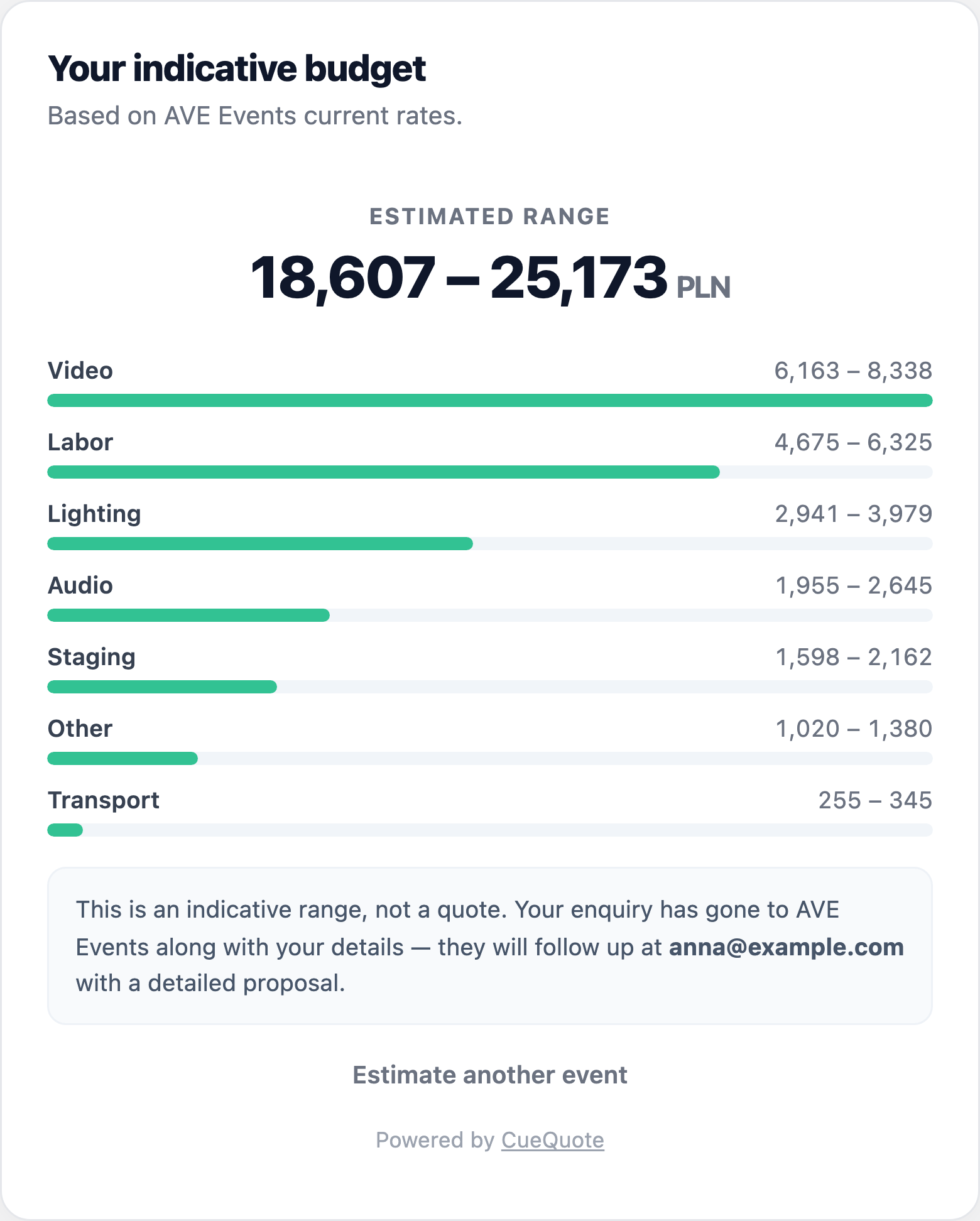
Wycena: przedział całkowity i podział na kategorie, policzony z własnego katalogu firmy. Ceny jednostkowe nigdy nie są pokazywane.
Najważniejsze jest to, czego odwiedzający nie widzi. Żadnych cen jednostkowych, listy sprzętu ani pozycji — tylko przedziały, wyraźnie oznaczone jako orientacyjne, a nie jako oferta. Twój cennik jest tym, co czyni wycenę trafną, i jednocześnie tym, czego nigdy byś nie opublikował. Zostaje po naszej stronie — i dlatego można to bezpiecznie umieścić na publicznej stronie, którą przeczyta konkurencja.
To, co dostajesz, jest znacznie lepsze niż formularz kontaktowy: e-mail z zapytaniem oraz czekająca w CueQuote w pełni wyceniona wersja robocza oferty w Twoich prawdziwych cenach, z już utworzonym i przypisanym klientem. Najwolniejsza część odpowiadania na zapytanie jest gotowa, zanim przeczytasz maila.
API REST. Jeśli wolisz sterować CueQuote z własnych systemów, wyślij opis wydarzenia metodą POST na /v1/proposals, a otrzymasz wycenioną ofertę w JSON — sumę, pozycje i link do udostępnienia. Utwórz klucz w Ustawieniach, wyślij go jako token bearer i to cała integracja. Pełna dokumentacja w dokumentacji API.
Webhooki. Odpytywanie API, aby dowiedzieć się, czy klient zaakceptował ofertę, jest marnotrawne i powolne. Zamiast tego dodaj adres, a my wyślemy podpisany ładunek w chwili, gdy oferta zostanie wysłana, wyświetlona, zaakceptowana lub odrzucona. Każda dostawa jest podpisana HMAC-SHA256, więc możesz udowodnić, że pochodzi od nas, a nie od kogoś, kto poznał Twój adres. Ustawienia pokazują liczbę dostaw i oznaczają adres, który przestał odpowiadać — bo integracja z CRM, która po cichu się psuje, nie informuje o tym nikogo, a oferty po prostu przestają docierać.
Serwer MCP. Połącz CueQuote z Claude, ChatGPT lub dowolnym asystentem obsługującym Model Context Protocol, a potem poproś zwykłym językiem: „Wyceń konferencję w Warszawie — 300 osób, scena główna z LED, cztery sale warsztatowe, 14 października”. Odpowiada na podstawie Twojego katalogu sprzętu i zapisuje wersję roboczą. Nie zgaduje cen — odpytuje Twoje konto.
Wszystkie cztery korzystają z tego samego estymatora. To ważniejsze, niż brzmi. Wycena stworzona przez formularz na Twojej stronie, przez API z Twojego CRM, przez asystenta albo przez Ciebie w aplikacji to ta sama wycena — ten sam katalog, te same ceny regionalne, te same zasady. Za integracjami nie kryje się drugi, gorszy silnik wyceny.
Żadna z nich nie może niczego wysłać klientowi. Wszystko, co tworzą integracje, to wersje robocze. Wysłanie pozostaje świadomą decyzją, którą podejmujesz w aplikacji po sprawdzeniu tego, co powstało — dokładnie tam, gdzie ta decyzja powinna być, gdy pierwszą wersję napisała maszyna.
Formularz wyceny na stronie jest dostępny w planie Pro i wyżej. API, webhooki i serwer MCP — w planie Business. Wszystkie cztery są udokumentowane z działającym kodem: formularz wyceny, API, webhooki i MCP. Jeśli budujesz coś, czego nie opisaliśmy, daj nam znać — wolimy usłyszeć o tym wcześnie.